Transforming Digital Designs into Physical Magic: A Guide to the Sparkler 3D Decoration
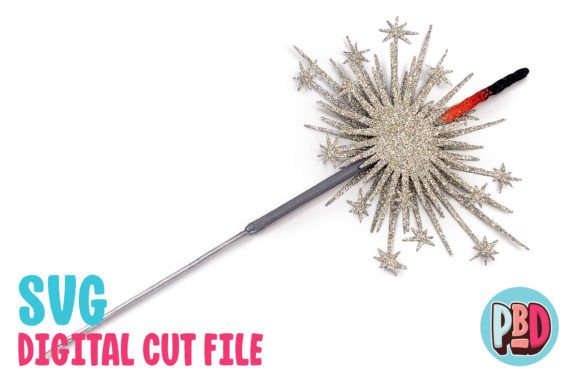
In the evolving landscape of digital crafting, the barrier between a screen and a tangible object has never been thinner. For hobbyists, event planners, and DIY enthusiasts, the ability to take a simple vector file and turn it into a stunning physical centerpiece is not just a skill—it is an art form. One such project that exemplifies this transformation is the Sparkler 3D Decoration. Designed with versatility in mind, this intricate piece is intended to be glued to a bamboo skewer, creating a dynamic visual element perfect for any celebration, party, or special event.
Whether you are looking to add a touch of whimsy to a birthday cake table, enhance the ambiance of a wedding reception, or simply bring some festive cheer to a holiday gathering, understanding how to execute this design effectively is key. This guide will walk you through the significance of 3D paper engineering, the practical applications of the Sparkler decoration, and the technical nuances of using digital cut files like SVG and DXF formats to bring your creative vision to life.
The Art of Paper Engineering and Modern Celebrations
Paper engineering—the practice of constructing three-dimensional structures from flat sheets of paper—has seen a resurgence in popularity. It combines the precision of graphic design with the tactile satisfaction of traditional crafts. The Sparkler 3D Decoration is a prime example of this intersection. Measuring approximately 6 inches wide by 12 inches tall with a depth of 0.5 inches, this design is substantial enough to command attention yet delicate enough to maintain an elegant aesthetic.
The primary purpose of this decoration is to serve as a focal point. When attached to a bamboo skewer, the "sparkler" effect creates movement and dimension. As guests move around a room, the light catches the textured surfaces, mimicking the flickering motion of actual sparklers without the safety hazards or smoke associated with pyrotechnics. This makes it an ideal choice for indoor events where fire risks are a concern but the desire for festive lighting remains high.
Why Cardstock Matters
A critical component of achieving a professional finish is selecting the right materials. The instructions for this specific design recommend using medium cardstock. Why is this distinction important? Lighter papers may lack the structural integrity needed to hold the complex folds and glue points required for a 3D shape, leading to sagging or collapsing structures. Conversely, heavy cardstock might be too rigid, making precise folding difficult and resulting in bulky seams that detract from the delicate look of the sparkler.
Medium cardstock strikes the perfect balance. It holds its shape well under tension, allows for crisp creases when scored properly, and provides a smooth surface that takes paint and texture beautifully. By adhering to the material specifications provided in the download, you ensure that the final product is both durable and visually striking.
Understanding Digital Cut Files: SVG vs. DXF
One of the most common points of confusion for beginners in the world of digital crafting is understanding the difference between file formats. The Sparkler 3D Decoration download includes two primary types of cut files: SVG (Scalable Vector Graphics) and DXF (Drawing Exchange Format). While both can be used to create the same physical object, their performance varies significantly depending on the software you use.
The Superiority of SVG Files
If you have access to modern cutting machines, such as those compatible with Cricut Design Space or Silhouette Designer Edition and above, the SVG file is your best option. SVG files are native to vector-based software, meaning they retain all their mathematical precision regardless of how much you zoom in or out. They load quickly, display clearly on the screen, and translate directly to the cutting blade’s path with minimal error.
For experienced users, the clarity of SVG files means less time spent troubleshooting and more time crafting. The lines are clean, the layers are organized, and the assembly process is streamlined. If possible, always default to using the SVG version of the file for the smoothest experience.
Navigating DXF Files for Basic Software
However, not everyone uses the latest software versions. Many users rely on Silhouette Basic Edition or other platforms that do not support SVG natively. For these users, the included DXF file is essential. DXF is an older, widely compatible format that serves as a universal language for CAD (Computer-Aided Design) programs.
Note: DXF files open slowly in Silhouette Studio and are often not as clean as SVG files. You may encounter jagged edges or misplaced nodes if the preferences are not set correctly. To ensure your file loads properly, you must adjust your import settings. Follow these steps carefully:
- Edit Preferences: Open your software and navigate to the preferences menu.
- Import DXF: Locate the section dedicated to importing external files.
- Change Setting: Look for the option labeled “As-is” and change it to “Centered”.
This adjustment ensures that the design aligns correctly within your workspace, preventing errors during the cutting process. While DXF files require a bit more patience, mastering them expands your toolkit, allowing you to work with a wider variety of software environments.
Assembly and Creative Enhancement
Once your pieces are cut, the real magic begins. The PDF instructions included in the ZIP file provide step-by-step guidance, but there are additional tips that can elevate your Sparkler 3D Decoration from a simple craft project to a gallery-worthy piece.
Texturing and Painting Tips
The beauty of this design lies in its potential for customization. The instructions include texturing and painting tips to help you personalize the look. Here are some strategies to consider:
- Metallic Finishes: Use gold, silver, or rose gold acrylic paints to mimic the glow of actual sparks. Apply these with a dry-brushing technique to highlight the raised textures of the 3D structure.
- Layered Colors: Instead of painting the entire piece one color, try using different shades on different panels. This adds depth and draws the eye to the intricate geometry of the design.
- Glitter Accents: For a truly festive look, apply a clear adhesive to specific sections and sprinkle fine glitter over them. This catches the light dynamically, enhancing the "sparkler" illusion.
Remember to let each layer of paint dry completely before applying glue. Moisture from wet paint can warp the cardstock, compromising the structural integrity of the 3D form. Working in a well-ventilated area also helps prevent smudging and ensures a professional finish.
Attachment to Bamboo Skewers
The final step involves attaching the decoration to a bamboo skewer. This requires precision. Ensure that the base of the Sparkler is flat and stable so it does not wobble once attached. Use a strong-drying craft glue or hot glue, depending on your preference for speed versus bond strength. Allow sufficient drying time before displaying the finished piece.
Practical Applications in Modern Events
So, where does the Sparkler 3D Decoration fit into your next event? Its versatility is its greatest asset. Because it is lightweight and safe, it can be used in ways traditional sparklers cannot.
Weddings: Place them along centerpieces or use them as unique favors for guests. The elegance of the 3D design pairs well with formal themes, especially when painted in metallic tones.
Birthday Parties: For children’s birthdays, these can be made in bright, bold colors. They serve as excellent table decorations that are safe around kids, unlike real fireworks.
Holiday Decor: During the winter holidays, white or silver sparklers can evoke the feeling of snow and ice, adding a magical touch to mantels or staircases.
In business contexts, these decorations can also be repurposed for corporate branding. Imagine a company logo transformed into a 3D sparkler structure, displayed at trade shows or office celebrations. The customizability of the digital file allows for endless branding opportunities.
Conclusion: Unlocking Creativity Through Technology
The Sparkler 3D Decoration is more than just a paper craft; it is a testament to how technology empowers creativity. By providing accessible digital files in both SVG and DXF formats, designers are making high-quality crafting available to everyone, regardless of their technical expertise. Whether you are a seasoned pro familiar with Cricut Design Space or a beginner navigating Silhouette Basic Edition, the key to success lies in preparation, patience, and attention to detail.
Remember to extract all files from the ZIP archive before beginning your project. Take the time to understand the differences between file formats, choose the appropriate cardstock, and experiment with textures and paints. With these tools and techniques, you can create a memorable, eye-catching decoration that brings joy and wonder to any occasion. Embrace the blend of digital precision and hands-on craftsmanship, and watch your ideas come to life in three dimensions.