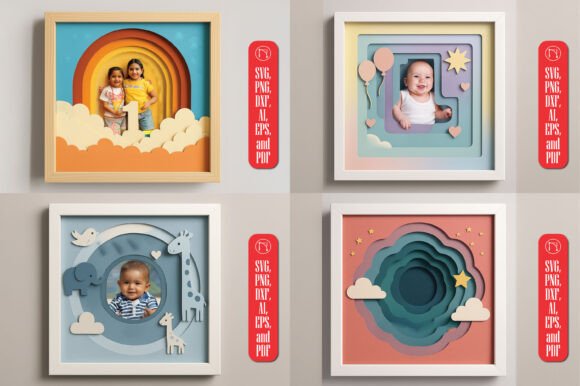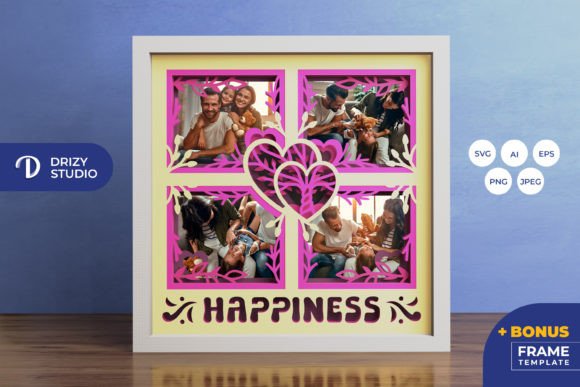
3D Family Gallery Shadow Box
Transforming simple photographs into tangible, multi-dimensional art is a rewarding creative endeavor that bridges the gap between digital memories and physical decor. The 3D Family Gallery Shadow Box offers a sophisticated way to display cherished moments by utilizing layered paper-cutting techniques. This project is not merely about framing a picture; it is about constructing an intricate visual narrative where depth, texture, and perspective play central roles in storytelling. Whether you are a seasoned crafter looking for your next complex challenge or a beginner eager to create a meaningful keepsake, this layered design provides a structured yet flexible canvas for creativity.
At its core, this template transforms flat images into a striking 3D effect. By stacking multiple layers of cut paper, each containing different elements of a family scene or portrait, the final assembly creates an illusion of depth that standard frames cannot achieve. The result is a piece of wall art that invites closer inspection, revealing new details as the viewer’s angle changes. It serves as both a decorative statement and a heartfelt tribute to family bonds, making it a popular choice for home interiors, gift-giving occasions, and personal memory preservation.
Understanding the Design and Specifications
The appeal of the 3D Family Gallery Shadow Box lies in its precise engineering and user-friendly format. The design consists of five distinct layers, carefully calculated to ensure proper alignment and visual balance when assembled. Each layer contributes to the overall composition, with foreground, midground, and background elements separated to create realistic spatial relationships. The base size of the shadow box is 20.32×20.32 cm, a square format that fits well within standard framing options and provides a balanced proportion for most portrait-style family photos.
One of the most significant advantages of this product is the variety of file formats provided, ensuring compatibility with various tools and skill levels. Users receive the template in AI, EPS, PNG, SVG, and JPEG formats. The inclusion of an SVG file is particularly valuable for those who own electronic cutting machines. This vector-based format allows for infinite scalability without loss of quality, meaning you can resize the design while maintaining the correct aspect ratio. Whether you wish to stick to the original dimensions or expand the shadow box for a larger display, the SVG ensures crisp edges and precise cuts every time.
- AI & EPS: Ideal for professional designers who need editable vector files for further customization.
- PNG & SVG: Perfect for direct upload to cutting software like Silhouette Studio or Cricut Design Space.
- JPEG: A high-resolution (3000 x 2000 px) preview image useful for planning and visualization before cutting.
Tools and Materials Needed
Creating your 3D Family Gallery Shadow Box requires minimal equipment, making it accessible to hobbyists and professionals alike. If you have access to a digital cutting machine such as a Silhouette or Cricut, the process becomes highly efficient. These machines can handle the intricate details of the five-layer design with precision, saving time and reducing the risk of human error associated with manual cutting. The SVG file is optimized for these devices, allowing you to send the design directly to the cutter with minimal setup.
For those who prefer traditional methods or do not own a cutting machine, the design is equally viable using an art knife and scissors. While this approach requires more patience and a steady hand, many crafters find the tactile experience of hand-cutting to be deeply satisfying. Regardless of the method chosen, the key to success is sharp tools and a clean cutting surface. Additionally, you will need adhesive materials to assemble the layers. Double-sided tape or glue dots work best because they provide strong adhesion without warping the paper or creating visible bumps that could disrupt the 3D effect.
Creative Applications and Customization
The versatility of this shadow box extends beyond simple wall decoration. Because the design relies on light passing through the layers, it is an excellent candidate for conversion into a lightbox. By inserting LED strips between the layers, you can illuminate the family gallery from behind, creating a warm, glowing ambiance. This technique highlights the silhouettes and details of the paper cuts, turning the shadow box into a stunning nightlight or accent lamp. This modification adds a modern twist to a traditional craft, appealing to those interested in interior lighting design.
In terms of gifting, the 3D Family Gallery Shadow Box holds immense sentimental value. It is an ideal present for weddings, anniversaries, birthdays, or holidays. Unlike generic store-bought gifts, a handmade shadow box demonstrates effort, thoughtfulness, and personal connection. You can customize the layers to include specific dates, names, or symbolic elements relevant to the recipient’s life story. For educators or bloggers, this project serves as a compelling example of DIY home decor, offering content ideas for tutorials or lifestyle blogs focused on family-oriented crafts.
Important Considerations for Success
While the instructions are straightforward, there are several practical tips to ensure your final product looks professional. First, always test your cut on scrap paper before working with your final material. This helps you adjust blade depth and speed if using a machine, or simply gives you confidence in the cutting path if working by hand. Second, pay attention to the order of assembly. The layers must be stacked in the correct sequence to maintain the intended depth perception. Using a small brush to apply glue sparingly prevents excess adhesive from seeping out and ruining the clean lines of the design.
Another crucial factor is the choice of paper. The color and texture of the paper significantly impact the final look. Lighter papers may require a darker background to provide contrast, while textured papers can add another dimension of visual interest. Be aware that the final product color may vary slightly due to lighting sources and the specific brand of paper used. The preview images are for illustrative purposes only, so experimenting with different paper stocks is part of the creative journey. Finally, remember that while SVG files allow for resizing, keeping the aspect ratio consistent is vital to prevent distortion of the family portraits within the layers.
Why Choose This Template?
Choosing the 3D Family Gallery Shadow Box template means opting for a blend of technical precision and artistic freedom. It removes the guesswork from designing a complex 3D structure while leaving ample room for personal expression. The availability of multiple file formats ensures that whether you are a digital pro or a hands-on crafter, you have the right tools to succeed. Furthermore, the project’s manageable size and clear layering make it less intimidating than larger shadow box projects, providing a satisfying sense of accomplishment upon completion.
Ultimately, this product is more than just a craft supply; it is a medium for preserving memories in a unique, three-dimensional format. It encourages users to slow down, engage with their photos, and think creatively about how they display their most valued moments. By following the included guidelines and leveraging the provided digital assets, anyone can produce a beautiful, custom-made piece of art that stands out in any home or office setting. Get started today and bring your family gallery to life with depth and dimension.